
 Bernd-René Predota
13f2c309e6
Bernd-René Predota
13f2c309e6
|
5 years ago | |
|---|---|---|
| doc | 5 years ago | |
| public | 5 years ago | |
| src | 5 years ago | |
| .gitignore | 5 years ago | |
| README.md | 5 years ago | |
| package-lock.json | 5 years ago | |
| package.json | 5 years ago | |
README.md
💰Expenses is a progressive web application on top of Google Sheets 📉 written in React ⚛️. It is only a static HTML that works great on mobile 📱 and can be deployed anywhere.
Check out the demo but please be considerate and don't break it for others.
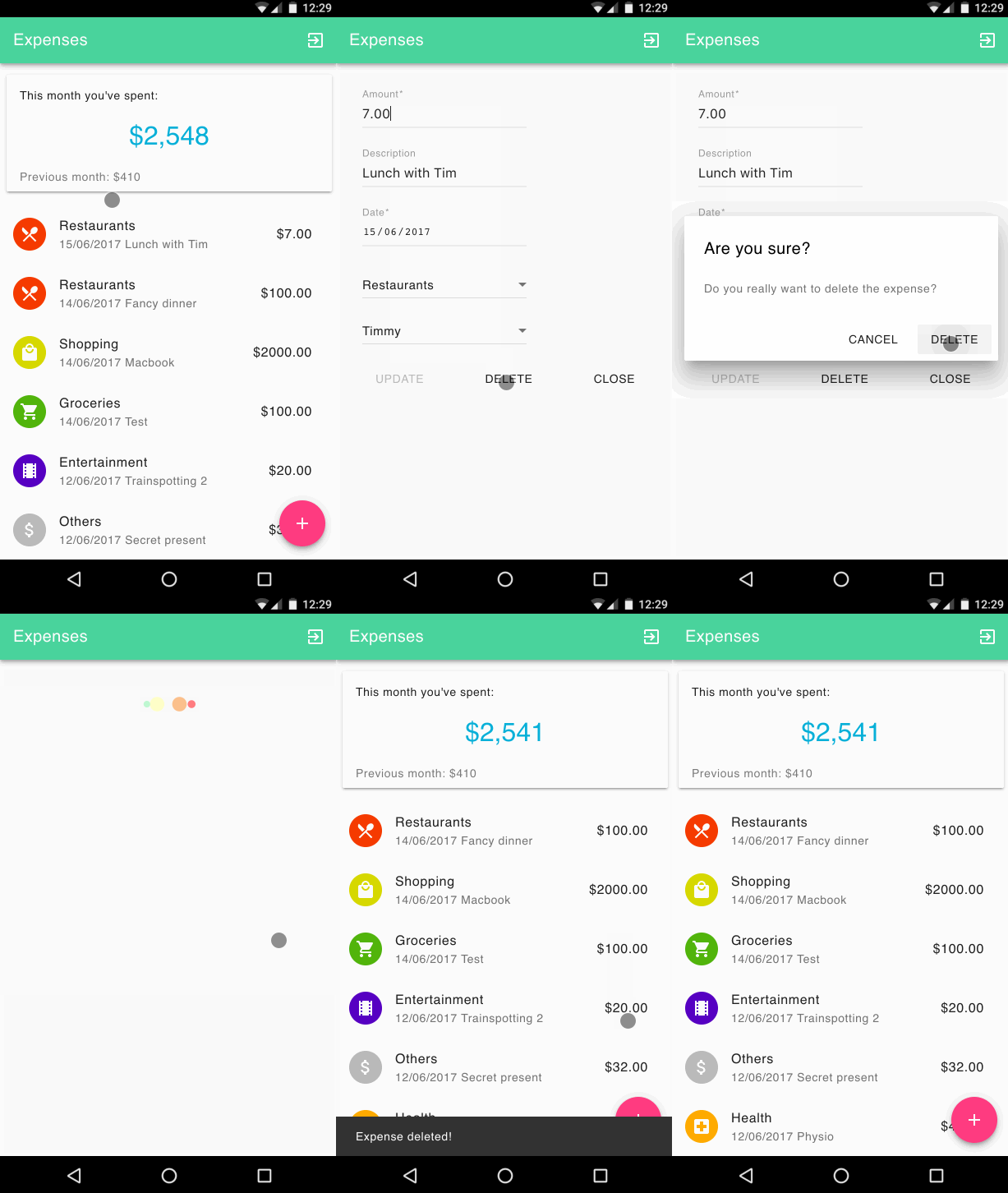
It was inspired by the expense-manager by mitul45 and it uses the material web components and material icons.
Features
- Multiple accounts
- Checking, savings, joint, etc.
- Categories
- Google Sheet as a backend
- Great privacy and access control.
- Don't share sensitive data with 3rd party.
- Unlimited analysis up to your sheet skill.
- Works great on mobile
- Progressive Web App. Loads quickly and works as a standalone app.
- Beautiful material design
- Better than native ;)
- Recurring expenses
- Totally doable with Zapier.
- Monthly summary
- This month. Last month. You immediately know how you doing.
Get started
You will need a somewhat recent version of Node and a place to deploy static HTML under a custom domain (doesn't have to be top level). To get the full offline support with service workers you'll need HTTPS – CloudFlare works fine or you can use your own certificate.
- make a copy of Expense Sheet to your drive
File -> Make a copy... - note the id of your new sheet (it's part of the URL)
- clone, install dependencies and build the app:
npm i && REACT_APP_SHEET_ID=<replace with your sheet id> npm run build
- copy the content of
buildfolder to your server
Recurring Expenses
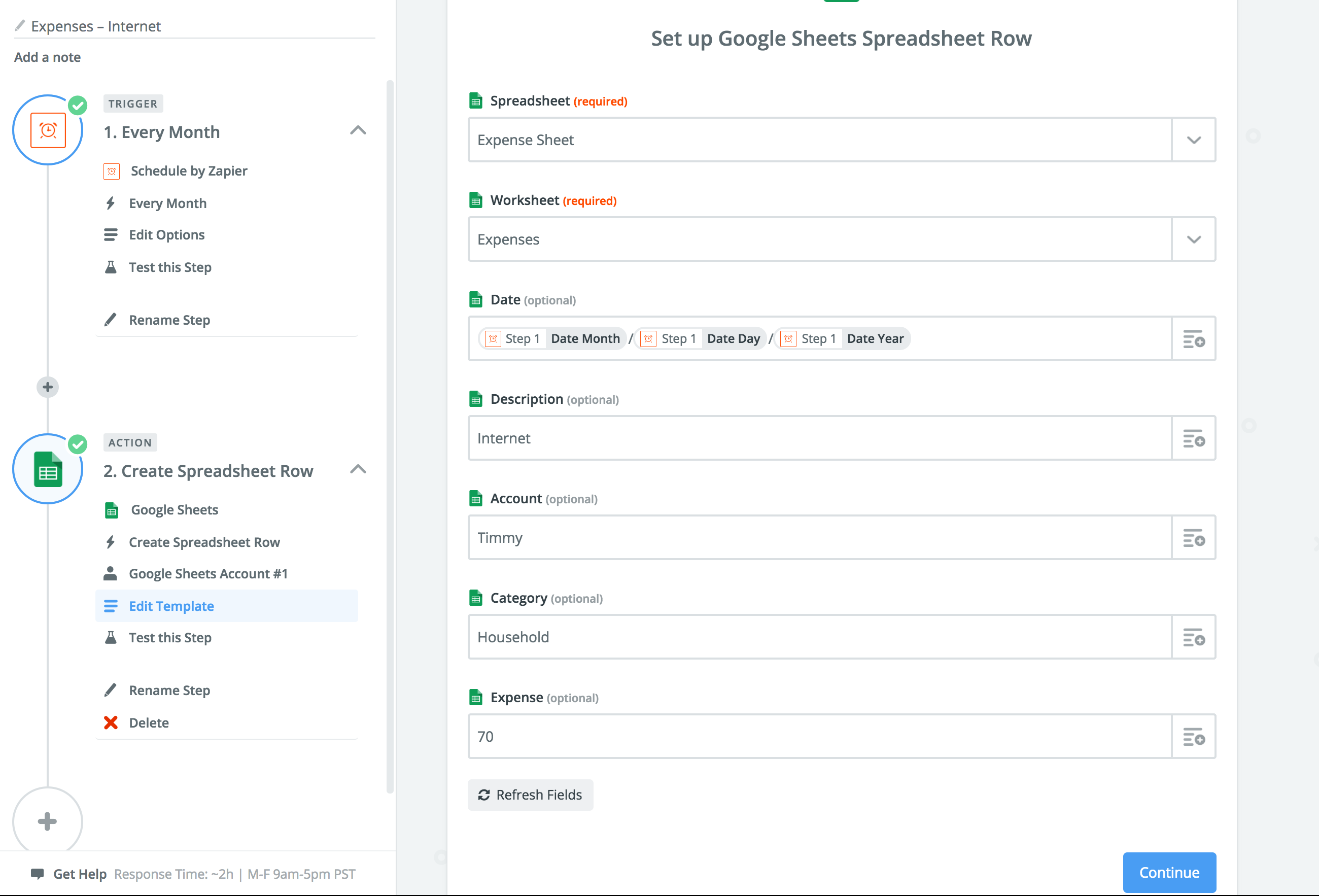
Zapier is a service for connecting apps and automating your workflows. And it can be used to add recurring expenses with the Google Sheets Integrations.
Select a trigger – it could be every month, week, or based on anything else.
Use the Create Spreadsheet Row integration and select your expense sheet and fill it with the desired values. Easy.
Sharing
Adding another person (for example your partner) to the app is easy – you just give them access to the expense sheet in Google Sheets.
After that, they have the same access as you are and can add expenses through the same URL.
If you like this project – you might also enjoy React Digest newsletter 🗞. Subscribe to get the top 5 news from React community every week.
Install
rm -rf node_modules && npm i && REACT_APP_SHEET_ID=1TT4oJ7B_Lq4quyizxK2DxGR_qhYtaG4Mn40j2MNpB6E npm run build && cd build && rm ../expenses.tgz && tar cvzf ../expenses.tgz * && scp ../expenses.tgz jumper@144spokes.com:/tmp/ && cd ..